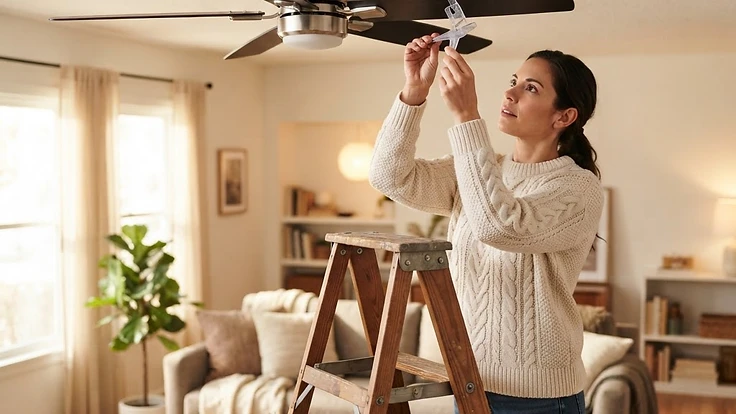
Why Your Ceiling Fan Wobbles (And How to Balance It Safely)
A wobbling ceiling fan usually isn't broken—it's unbalanced, and most causes can be fixed in under an hour.
That Wobble Isn't Just Annoying—It's a Warning Sign
A ceiling fan that wobbles, ticks, or sways while it spins isn't just noisy—it's telling you something is out of balance. Left alone, that wobble can loosen the mounting bracket over time, strain the motor, and in rare cases cause the fan to fall. The good news: most wobbling fans aren't defective. They're just unbalanced, and the fix usually takes less than an hour with tools you already own.
Before you reach for a replacement fan, walk through these common causes in order. They're listed from most likely to least likely, so you'll probably solve it before you get to the bottom of the list.
1. Start With the Mounting Bracket
The single most common cause of a wobbling fan is a loose connection between the fan and the ceiling—not the blades themselves.
- Turn off power to the fan at the breaker, not just the switch.
- Remove the canopy (the decorative cover where the fan meets the ceiling) to expose the mounting bracket.
- Check that the bracket is screwed tightly into a ceiling joist or a proper fan-rated electrical box. A standard light-fixture box is not strong enough to support a ceiling fan and will flex under the fan's weight, causing a wobble that gets worse over time.
- Tighten any loose screws connecting the fan's mounting ball or bracket to the downrod.
If the box itself moves when you gently push on it, that's your real problem—and it's worth replacing with a fan-rated box before doing anything else.
2. Check the Blade Screws and Brackets
Each blade attaches to the motor through a blade arm (sometimes called an iron), and each arm is held by a few screws. Over months of spinning, vibration gradually loosens these screws.
- With the fan off and blades accessible, gently wiggle each blade. Any movement means loose screws.
- Tighten every screw on every blade arm, even the ones that seem fine. One loose arm is often enough to throw off the whole fan.
- Check where the blade arms attach to the motor housing as well—these connections loosen too.
This step alone fixes a surprising number of wobble complaints.
3. Measure for Warped or Uneven Blades
Wood and plastic fan blades can warp slightly from heat, humidity, or just age—even if they look fine to the eye.
Here's a simple way to check:
- Stand on a stable stool and hold a yardstick or tape measure against the ceiling, then measure down to the tip of each blade.
- Rotate the fan by hand (power off) and measure each blade at the same point relative to the ceiling.
- If one blade's tip sits more than about 1/4 inch higher or lower than the others, that blade is likely warped or bent, or its arm is slightly out of alignment.
A warped blade usually needs replacing. Many manufacturers sell individual replacement blades, which is cheaper than buying a whole new fan—check your fan's brand and model number, often printed on a label inside the canopy or on the motor housing.
4. Weight-Balance With a Fan Balancing Kit
If all the blades measure evenly and everything is tightened, but the wobble persists, the issue is likely weight distribution rather than physical alignment. This is common with wood blades that absorb moisture unevenly.
A fan balancing kit (available for a few dollars at any hardware store) includes a small plastic clip and adhesive weights. Here's how to use one:
- Turn the fan on and let it run at medium speed.
- Clip the balancing clip onto the middle of one blade, partway between the base and the tip.
- Watch whether the wobble improves or worsens. If it improves, that's likely the problem blade; if it worsens, move to a different blade.
- Once you've identified the blade causing the imbalance, slide the clip along the blade's length to find the spot where the wobble disappears most.
- Mark that spot, remove the clip, and stick one of the adhesive weights at that exact location on top of the blade (where it won't be visible from below).
- Turn the fan back on to confirm the wobble is gone.
This method sounds fussy, but it works because it treats the actual physics of the problem—uneven mass distribution—rather than guessing.
5. Rule Out the Downrod (For Fans With Extension Rods)
If your fan hangs from a downrod rather than mounting flush to the ceiling, a bent rod can cause a wobble that no amount of blade balancing will fix. Power off the fan, and visually sight down the rod from below—any visible bend or curve means the rod needs replacing. This is less common but worth a 30-second check if the other fixes don't resolve the issue.
When to Stop and Call a Professional
Most ceiling fan wobbles are mechanical, not electrical, and safe for a confident DIYer to handle. But call an electrician if you notice the fan flickering, the switch feels warm, you smell anything burning, or the ceiling box itself feels unstable even after tightening—that could point to wiring or structural issues beyond a simple balance fix.
This article is general information and not legal, financial, or medical advice.
A Quiet, Steady Fan Is a Quick Win
A wobbling ceiling fan is one of those small home annoyances that's genuinely satisfying to fix, because the cause is almost always visible once you know where to look. Fifteen minutes with a screwdriver and a cheap balancing kit can turn a shaky, noisy fan back into background white noise—exactly what it's supposed to be.
Want help tracking recurring maintenance tasks like this one before they turn into bigger problems? Start your free HomeNostics trial and keep your whole home running smoothly, room by room.